Family Annual Information Review (FAIR)
Aspen Family Portal Information
Dear Parents and Guardians,
We are pleased to announce that the North Kingstown School District has launched a new online collection tool to replace our three previous annual information workflows. This updated system simplifies how you submit annual information for your children attending NK schools.
Tips for Completing the Form:
Mobile Recommended: We suggest using a smartphone or tablet, as the forms were specifically optimized for mobile devices.
Desktop Users: If you are using a laptop or desktop computer, please switch to the "Mobile View" tab to ensure the screen matches the instruction guide.
If you experience any technical issues while completing the form, please email aspenhelp@nksd.net for assistance.
Thank you for your continued partnership!
North Kingstown School District
Once you are on the app Follett Aspen, on your phone, or on just our ASPEN website, Mobile version, you will see on the home page a list of side tabs .
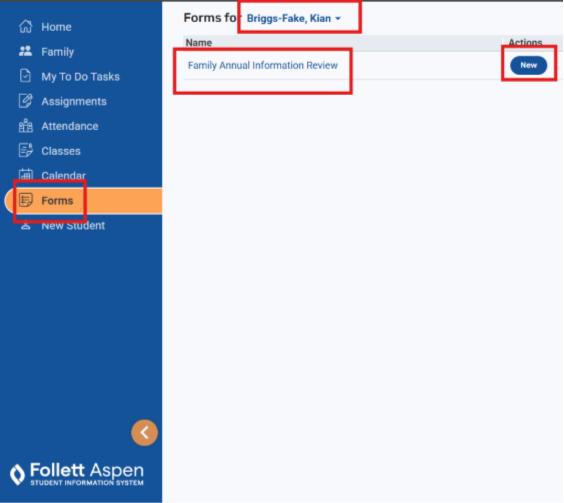
You will be going through the 7 tabs listed in the red boxes I outlined.
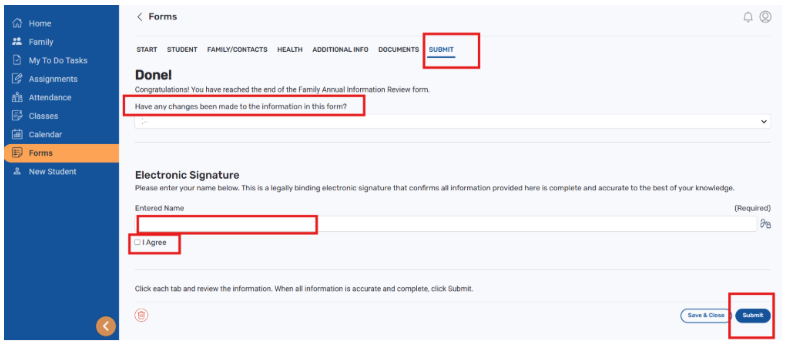
After reviewing a page, and making any necessary edits or additions, you will be checking off at the bottom of the page for each tab:
Yes or no under Are there any changes to this page.

On the last tab you will have the opportunity to let us know if you had ANY changes to the form and then you can electronically sign and agree to the signature and Click SUBMIT.
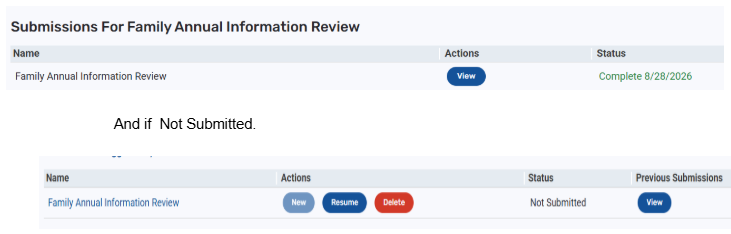
This is what you will see on your Forms page once you have started the Form. In the Status section will be the date you completed